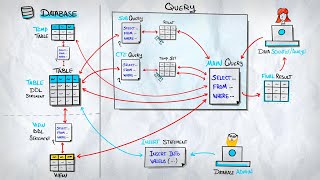
Imagine a whiteboard you wheel into a meeting. You scribble figures on it, refer back to them as the discussion unfolds, rearrange them — and when the meeting ends, you wipe it clean and roll it away. A temporary table is SQL's whiteboard: a genuine table that you can fill, index, and query as many times as you like, but which exists only for as long as you need it and then disappears on its own.
What a Temporary Table Is
A temporary table is a real table. It has columns and rows, you can insert into it, update it, delete from it, join it to other tables, and even add indexes to it — everything you can do with an ordinary table. The one difference is its lifespan: a temporary table lives only temporarily, typically for the duration of your database session, and then it is removed automatically.
Two properties make temporary tables especially useful. First, they are private to your session. If two people each create a temporary table called top_customers, they get two completely separate tables that cannot see each other. Second, they clean up after themselves: when your session ends, the database discards the table without you having to remember to delete it.
Other tools exist for holding intermediate results — notably the Common Table Expression (CTE), a named temporary result set created with the WITH keyword that exists only for the duration of a single query. A temporary table is the right choice when you need that intermediate result to survive longer than one statement.
The Sample Dataset
Every example in this article uses two small tables you can trace by hand.
customers
| customer_id | name | city |
|---|---|---|
| 1 | Alice | London |
| 2 | Bob | Paris |
| 3 | Carla | Berlin |
| 4 | Diego | Madrid |
orders
| order_id | customer_id | total | status |
|---|---|---|---|
| 101 | 1 | 89.50 | shipped |
| 102 | 1 | 42.00 | pending |
| 103 | 2 | 150.00 | shipped |
| 104 | 3 | 27.75 | cancelled |
| 105 | 5 | 60.00 | shipped |
Two details are deliberate: Diego (customer 4) has placed no orders, and order 105 belongs to customer_id = 5, who does not exist in the customers table.
Why Use a Temporary Table?
A temporary table earns its place when you need one or more of the following:
- Persistence across multiple statements. Once created, the table stays available for the rest of your session. You can compute a result in one statement and reference it in many later statements.
- Indexes for performance. Because it is a real table, you can add an index to it. If you intend to join or filter the intermediate result repeatedly, an index can make a dramatic difference.
- Step-by-step debugging. You can run
SELECT * FROM temp_tablebetween stages of a complex transformation to inspect exactly what the data looks like at each point — something you cannot do with a result that only exists mid-query. - Reuse — compute once, query many times. Expensive aggregations or joins can be materialised a single time, then queried from several angles without recomputing.
Creating a Temporary Table
The syntax is broadly similar across engines, with one notable quirk in SQL Server. The scope — how long the table lives and who can see it — is the session by default in every major engine.
| Engine | Syntax | Default scope |
|---|---|---|
| PostgreSQL | CREATE TEMPORARY TABLE (or TEMP) | Session |
| MySQL | CREATE TEMPORARY TABLE | Session |
| SQL Server | CREATE TABLE #name (local) / ##name (global) | Session / all sessions |
| SQLite | CREATE TEMPORARY TABLE (or TEMP) | Session |
| Amazon Redshift | CREATE TEMPORARY TABLE (or TEMP, or #name) | Session |
SQL Server is the special case. A name beginning with a single # creates a local temporary table visible only to your session; a name beginning with ## creates a global temporary table visible to all sessions. Everywhere else, the TEMPORARY keyword does the job.
Two Ways to Populate a Temporary Table
Option A — CREATE TABLE AS SELECT (CTAS)
The fastest path: create the table and load it from a query in a single statement. The column names and types are inferred from the query.
Option B — CREATE then INSERT
Two steps: first declare the structure, then insert the rows. This is the better choice when you want precise control over column types, constraints, or indexes before any data lands.
A Practical Example — Customers Who Spent More Than 100
Suppose we want the group of customers whose total spend exceeds 100, and then we want to ask several different questions about that group. We build it once, then query it again and again:
① high_value (the temp table)
| customer_id | name | total_spend |
|---|---|---|
| 1 | Alice | 131.50 |
| 2 | Bob | 150.00 |
② Reused across queries
| query | result |
|---|---|
| COUNT(*) | 2 |
| cities | London, Paris |
| AVG spend | 140.75 |
Alice totals 131.50 (89.50 + 42.00) and Bob totals 150.00 — both clear the threshold. Carla's 27.75 falls short, and order 105 belongs to customer 5, who is not in the customers table, so the inner join drops it. The key point: high_value was built once and answered three separate questions across three independent statements.
Indexing a Temporary Table
Because a temporary table is a real table, you can index it just like any other. If you are going to join or filter it repeatedly — especially when it holds many rows — an index can turn a slow repeated scan into a fast lookup.
A CTE has no persistent storage and therefore cannot carry an index. When repeated, indexed access to an intermediate result matters, the temporary table is the natural tool.
The Lifecycle of a Temporary Table
A temporary table is born when you run its CREATE statement and is destroyed in one of three ways:
- End of session — the default in PostgreSQL, MySQL, SQLite, and Redshift. When your connection closes, the table vanishes.
- End of transaction — in PostgreSQL you can opt into this with
ON COMMIT DROP(remove the table when the transaction commits) orON COMMIT DELETE ROWS(keep the empty structure, clear the rows). - Explicit DROP — you can always remove it yourself with
DROP TABLE.
Common Pitfalls and Good Practices
- Naming collisions in pooled sessions. If your application reuses database connections from a pool, a temporary table created earlier may still exist when the connection is handed to the next task. Use distinct names, or drop the table when you finish with it.
- Forgetting to drop temp tables. In short scripts the session ends quickly and cleanup is automatic. In long-lived connections, stray temporary tables accumulate and consume memory or disk. Drop them explicitly when done.
- Remember they are real writes. Populating a temporary table physically writes rows. For a handful of rows this is instant; for tens of millions it is a genuine cost. A temp table pays off when you reuse the data several times, not when you read it once.
- In SQL Server, drop explicitly. Because of connection pooling, prefer
DROP TABLE #namewhen you are done rather than relying on session end — pooled sessions can stay alive far longer than you expect.
Closing Thoughts
A temporary table is a full-featured table with a short life: create it, fill it, index it, query it as often as you need, and let it vanish when your session ends. It shines in multi-step workflows — when an intermediate result must persist across several statements, be inspected for debugging, or carry an index for speed.
It is not the only way to hold an intermediate result, though. For logic that lives inside a single query, a Common Table Expression is often cleaner and lighter. Knowing precisely when each tool is the better fit — the persistence and indexing of a temporary table versus the in-query elegance of a CTE — is what lets you reach for the right one every time.
Main References
- PostgreSQL Global Development Group — CREATE TABLE (TEMPORARY) — postgresql.org/docs/current/sql-createtable.html
- Oracle Corporation — MySQL 8.0 Reference Manual: CREATE TEMPORARY TABLE — dev.mysql.com/doc/refman/8.0/en/create-temporary-table.html
- Microsoft — CREATE TABLE (Transact-SQL) — learn.microsoft.com/en-us/sql/…/create-table-transact-sql
- SQLite Consortium — CREATE TABLE — sqlite.org/lang_createtable.html
- Amazon Web Services — Redshift Developer Guide: CREATE TABLE — docs.aws.amazon.com/redshift/…/r_CREATE_TABLE_NEW.html